TitanForge EA MT5 v1.3 with Unlimited SetFiles
$15.00
98.5% OFFWhat you get
- Automated Forex Trading
- Advanced Position Sizing
- Smart Trade Management
- Risk Management Controls
- Economic News Protection
What is TitanForge EA MT5 v1.3 with Unlimited SetFiles?
Platform: MetaTrader 5 (MT5)
Product Type: Automated Forex Trading Software
Version: 1.3
SetFiles: Unlimited
Trading System: Automated Trading and Advanced Trade Management
TitanForge EA MT5 v1.3 is an advanced Forex Expert Advisor (EA) developed for the MetaTrader 5 trading platform. Designed to combine automated trade execution, intelligent position sizing, dynamic stop management, and advanced chart-based market analysis, TitanForge provides a comprehensive automated trading environment for traders interested in algorithmic Forex trading.
Whether you are researching Forex automation, exploring MT5 trading robots, or looking for an Expert Advisor with customizable trading parameters, TitanForge EA MT5 offers a wide range of configuration options to suit different trading preferences.
One of its key advantages is its Unlimited SetFiles support, allowing users to organize, save, load, and customize multiple trading configurations instead of relying on a single fixed setup.
TitanForge EA MT5 v1.3 combines several important trading-management components:
Automatic position volume calculation.
Customizable position risk levels.
Configurable Take Profit and Stop Loss.
Dynamic trailing stop management.
Spread and execution protection.
Daily and overall loss thresholds.
Economic calendar news controls.
Advanced market structure visualization.
Customizable chart interface and animated analysis panels.
The EA also includes a sophisticated visual framework featuring ZigZag structure nodes, projected target zones, price-distance labels, market scanning animations, and real-time chart information panels.
For traders looking for an advanced MetaTrader 5 Expert Advisor with customizable settings and unlimited configuration files, TitanForge EA MT5 v1.3 offers an extensive collection of trading and visualization controls.
Important: Automated trading involves substantial financial risk. Results depend on market conditions, broker execution, spreads, account settings, and the configuration used. No profits are guaranteed.
Recommended Trading Currency Pairs
Potential symbols to evaluate through independent strategy testing include:
EURUSD – Euro / US Dollar
GBPUSD – British Pound / US Dollar
USDJPY – US Dollar / Japanese Yen
AUDUSD – Australian Dollar / US Dollar
USDCAD – US Dollar / Canadian Dollar
XAUUSD – Gold / US Dollar
Trading Pair Compatibility: Confirm symbol compatibility, broker specifications, spread conditions, and execution behavior before using any symbol.
XAUUSD and other volatile instruments require particular attention to position sizing and risk controls. The inclusion of a symbol in this list does not indicate proven profitability or compatibility.
TitanForge EA MT5 v1.3 with Unlimited SetFiles Features
TitanForge EA MT5 v1.3 with Unlimited SetFiles – Best Settings
TitanForge EA MT5 v1.3 offers a comprehensive range of customizable trading parameters designed to manage automated trade execution, position sizing, stop-loss protection, trailing stops, and market analysis.
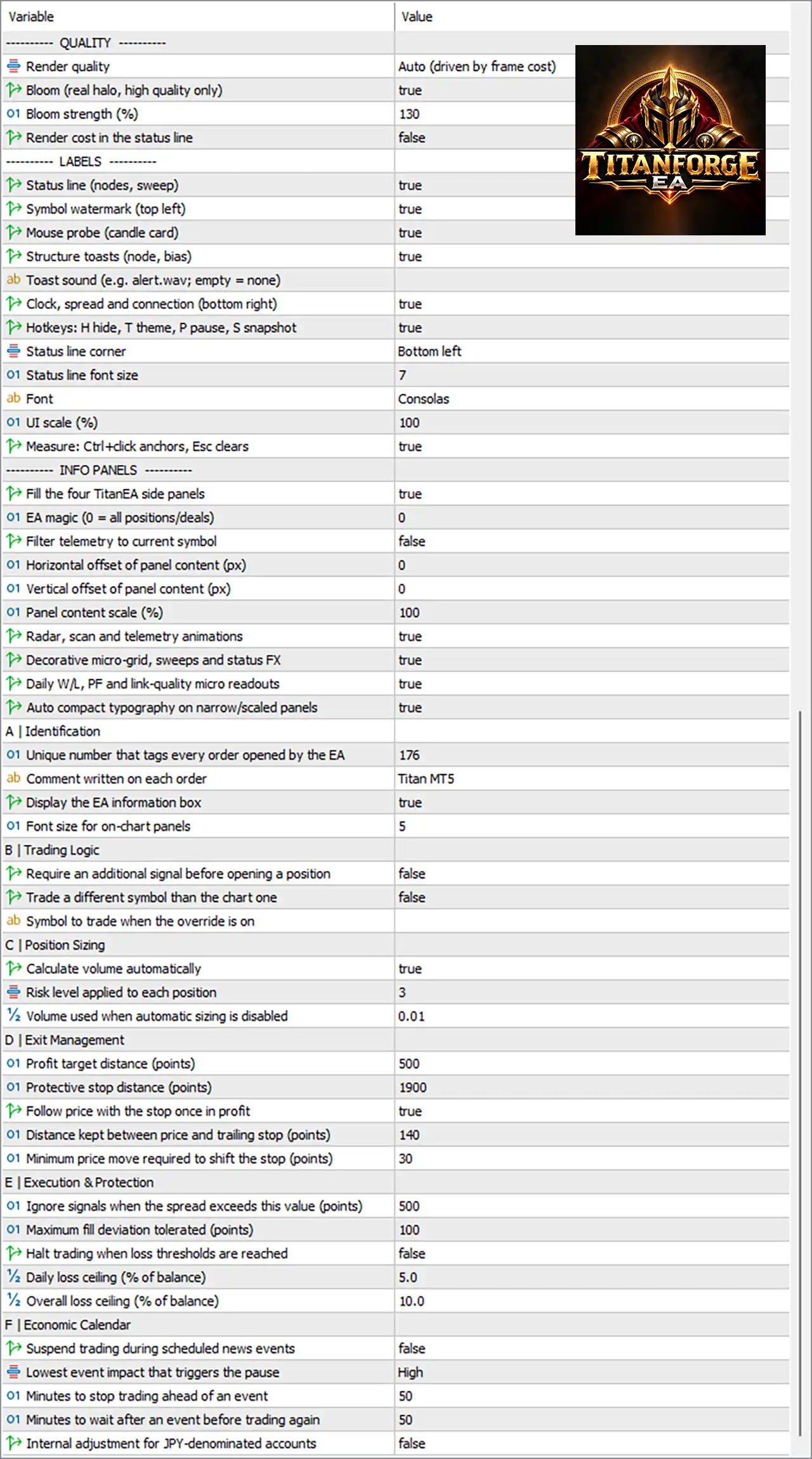
The following configuration table provides the default reference settings supplied with TitanForge EA MT5 v1.3. Traders can use these parameters as a starting point when testing and customizing their automated trading strategy.
TitanForge EA MT5 Recommended Settings
| Trading Parameter | Configuration |
|---|---|
| Automatic Position Sizing | Enabled (True) |
| Risk Level | 3 |
| Fixed Volume | 0.01 Lot |
| Take Profit | 500 Points |
| Stop Loss | 1900 Points |
| Trailing Stop | Enabled (True) |
| Initial Trailing Distance | 140 Points |
| Minimum Stop Movement | 30 Points |
| Maximum Spread | 500 Points |
| Maximum Fill Deviation | 100 Points |
| Daily Loss Ceiling | 5.0% |
| Overall Loss Ceiling | 10.0% |
| Stop Trading at Loss Threshold | Disabled (False) |
| Economic News Filter | Disabled (False) |
| News Impact Level | High |
| Pre-News Pause | 50 Minutes |
| Post-News Pause | 50 Minutes |
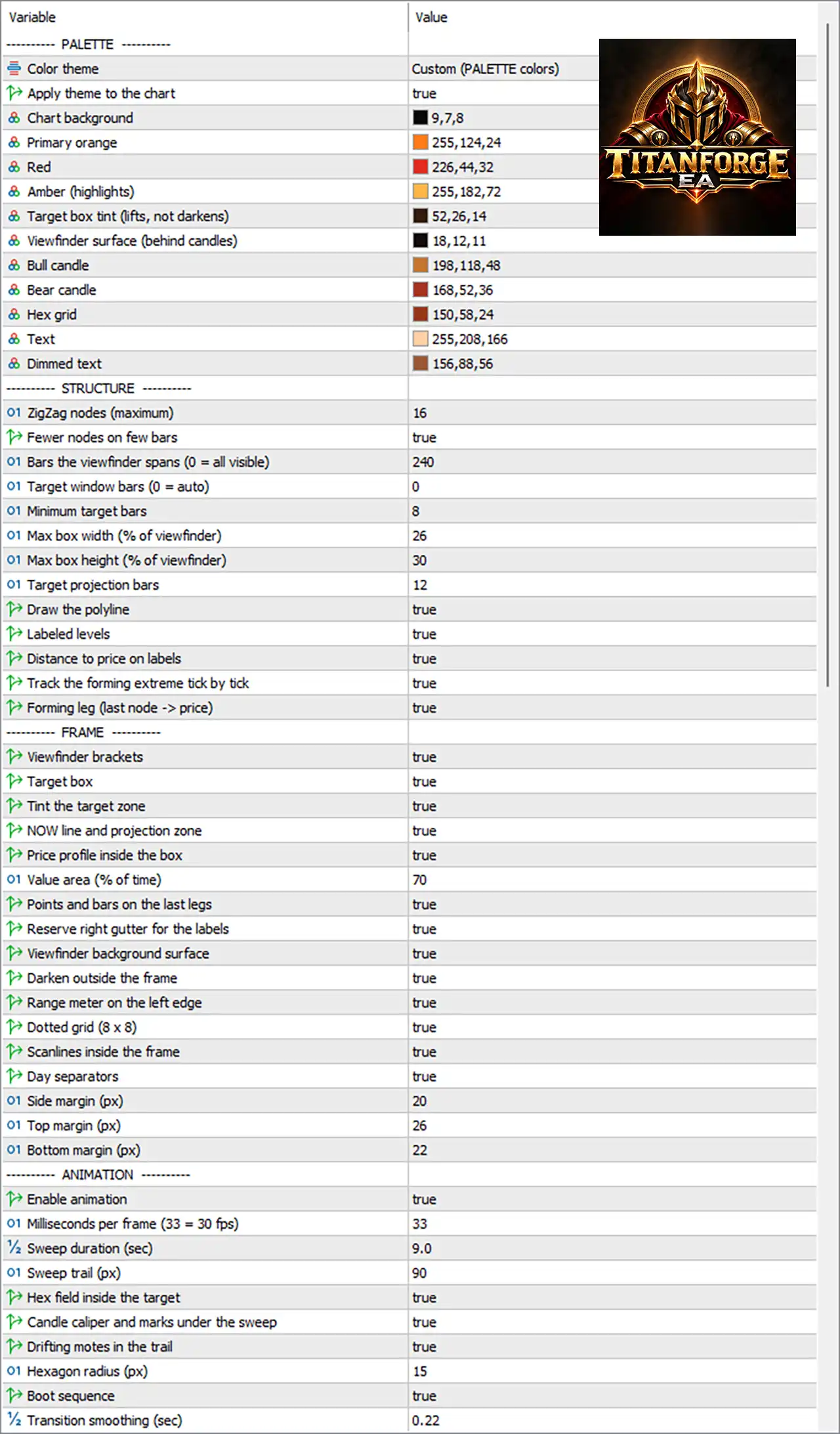
| Maximum ZigZag Nodes | 16 |
| Viewfinder Bars | 240 |
| Target Projection Bars | 12 |
| Value Area | 70% |
Understanding the TitanForge EA MT5 Settings
1. Position Sizing and Risk Management
TitanForge EA MT5 includes automatic position volume calculation and adjustable risk settings. The supplied configuration enables automatic position sizing with Risk Level 3, while 0.01 lot is specified as the fixed volume when automatic sizing is disabled.
2. Take Profit and Stop Loss Management
The reference configuration uses a 500-point Take Profit and a 1900-point protective Stop Loss. These parameters define the configured price distances for trade exit management.
3. Dynamic Trailing Stop
The trailing stop feature is enabled, with an initial trailing distance of 140 points and a minimum price movement requirement of 30 points. This allows the EA to adjust stop placement as the market moves into profit.
4. Trading Execution Protection
The EA includes spread filtering and execution deviation controls. The supplied configuration uses a maximum spread threshold of 500 points and a maximum fill deviation of 100 points.
5. Daily and Overall Loss Controls
TitanForge EA provides configurable daily and overall loss thresholds of 5% and 10%, respectively. However, the automatic trading-halt option is disabled in this preset. Traders should review this setting carefully rather than assuming the loss thresholds automatically stop trading.
**6. Economic News Settings**
The EA includes economic calendar protection with High-impact news filtering and configurable 50-minute waiting periods before and after an event. The news suspension feature is currently disabled.
7. Advanced Market Analysis Settings
TitanForge's visual analysis framework includes up to 16 ZigZag structure nodes, a 240-bar viewfinder, 12-bar target projection, and a 70% value-area setting. These parameters customize the EA's on-chart market structure and target visualization.
Important Trading Recommendations
- Review all EA parameters before starting automated trading.
- Check broker-specific symbol specifications and spread conditions.
- Understand the difference between automatic and fixed position sizing.
- Review daily and overall loss protection settings.
- Test different configurations using historical data.
- Forward-test the EA on a demo account before considering live deployment.
Disclaimer: These are the supplied reference configuration values, not independently verified best-performing settings. Trading results are not guaranteed and may vary depending on broker execution, market volatility, account conditions, and individual configurations.
TitanForge EA MT5 v1.3 combines customizable trading parameters, automated position management, dynamic trailing stops, and advanced market visualization to provide a flexible MetaTrader 5 automated trading environment.
Instructions for Installing TitanForge EA MT5 v1.3 with Unlimited SetFiles
Step 1: Download the EA
Purchase and download the TitanForge EA MT5 v1.3 package from fxearobot.com.
Step 2: Open MetaTrader 5
Launch your MetaTrader 5 trading platform.
Step 3: Open the Data Folder
Navigate to:
File → Open Data Folder
Step 4: Locate the Experts Folder
Open:
MQL5 → Experts
Copy the TitanForge EA file into the Experts directory.
Step 5: Install SetFiles
If your package contains preset files, place them in the appropriate MT5 Presets directory or follow the package-specific instructions.
Step 6: Refresh Expert Advisors
Return to MetaTrader 5 and refresh the Navigator panel, or restart the platform.
Step 7: Attach TitanForge EA
Open your selected chart and attach TitanForge EA MT5 from the Navigator panel.
Step 8: Configure EA Inputs
Review the available trading parameters, including position sizing, risk level, Stop Loss, Take Profit, trailing stop, and protection settings.
Step 9: Enable Automated Trading
Enable the platform's Algo Trading feature and verify that the EA is permitted to operate.
Step 10: Test Before Live Use
Start with a demo environment and evaluate the EA's behavior before considering any live trading.
Who Should Use TitanForge EA MT5 v1.3 with Unlimited SetFiles?
1. Forex traders researching automated trading systems.
2. MetaTrader 5 users interested in Expert Advisors.
3. Algorithmic trading enthusiasts.
4. Traders who want customizable trading parameters.
5. Users who prefer managing multiple SetFiles configurations.
6. Traders interested in advanced chart visualization.
7. Experienced users who understand automated trading risks and account management.
This product is not a guaranteed income solution and is not suitable as a substitute for understanding Forex trading risks.
Download TitanForge EA MT5 v1.3 with Unlimited SetFiles
TitanForge EA MT5Pros and Cons
Pros
Cons
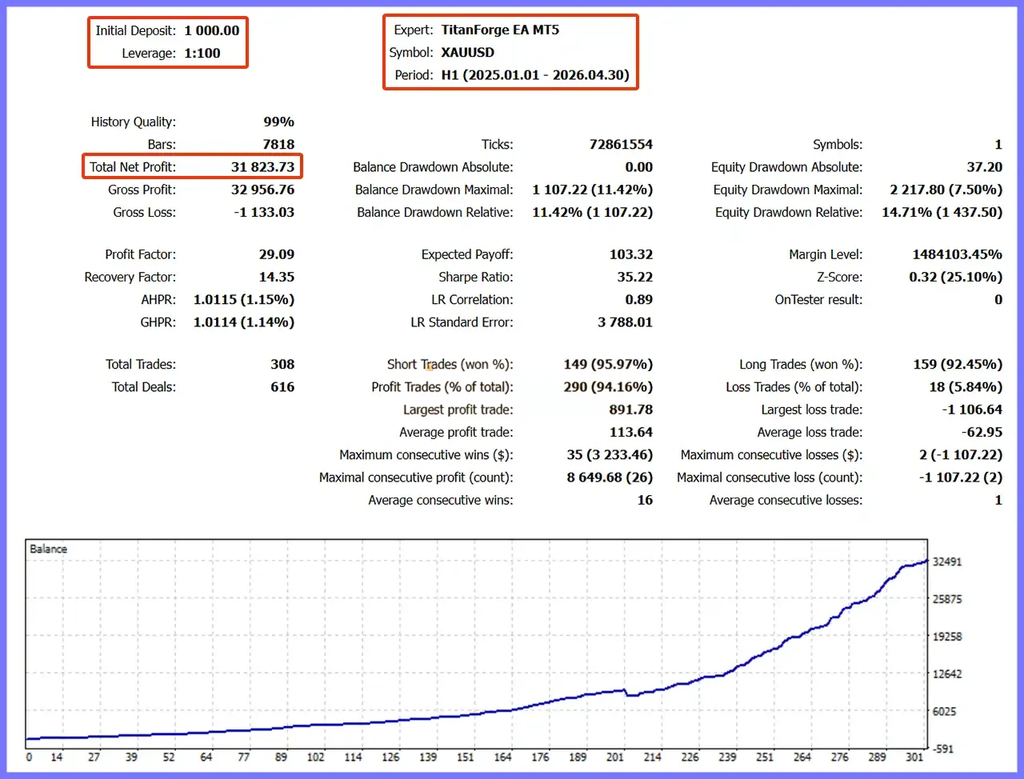
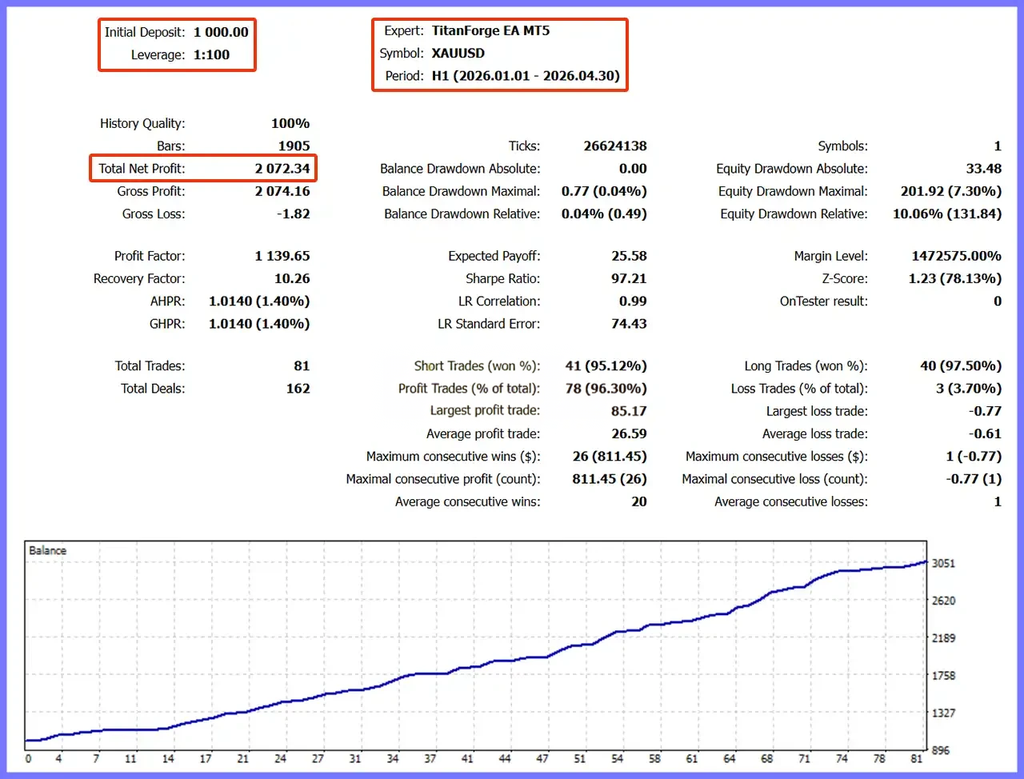
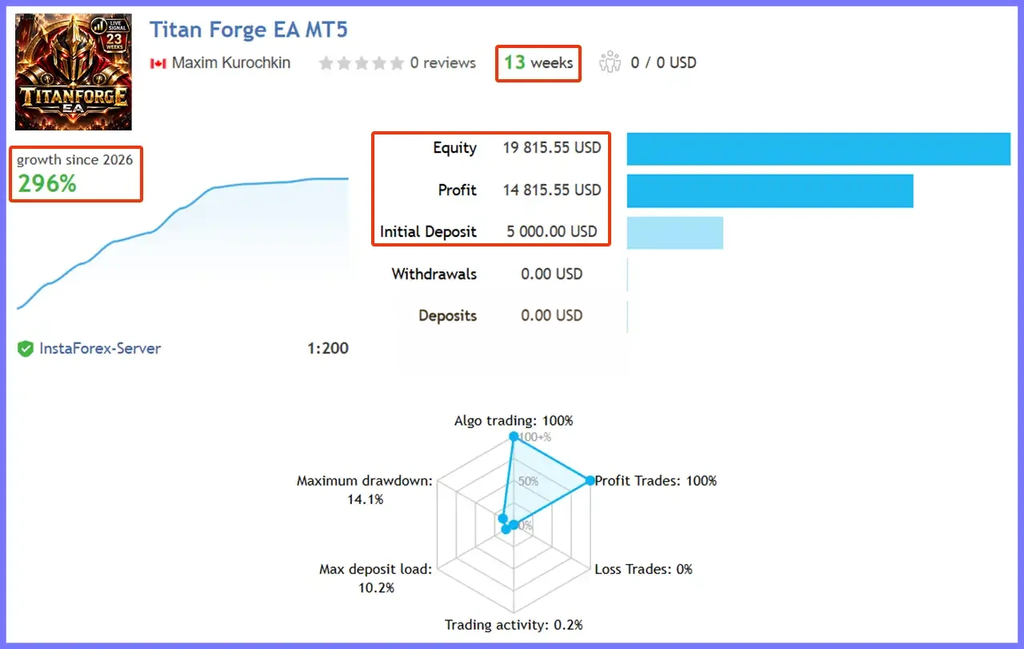
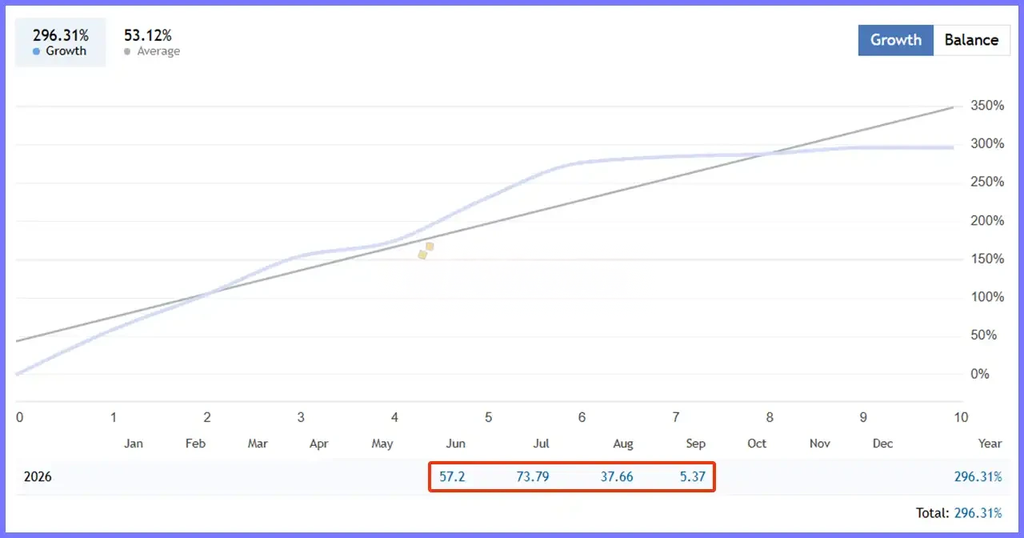
Backtest Results
Final Verdict – Is TitanForge EA MT5 v1.3 with Unlimited SetFiles Worth It?
Its combination of automatic volume calculation, trailing stop management, spread filtering, loss-threshold settings, and customizable chart analysis makes it an interesting option for traders researching feature-rich MT5 trading software.
The unlimited SetFiles support is particularly useful for organizing different configuration presets for testing and comparison.
However, traders should understand the supplied settings, evaluate the EA on a demo account, and independently verify its behavior before considering live use.
Conclusion
With its combination of trade-management controls, configurable position sizing, trailing stop functionality, economic-news settings, and advanced visual analysis, TitanForge provides a comprehensive set of tools for exploring automated trading on MetaTrader 5.
Explore TitanForge EA MT5 v1.3 at fxearobot.com and discover its configuration capabilities.
Trade responsibly. Test before live deployment. Past or hypothetical performance does not guarantee future results.
What's Included
Login to add your review.
TitanForge EA MT5 offers a wide range of trading configuration options. I particularly like its automatic position sizing, trailing stop management, and advanced chart visualization. The customizable settings make it interesting to explore.
The Unlimited SetFiles feature is a useful addition. It allows me to organize different trading configurations for testing. The EA also provides plenty of customizable parameters.
I like the professional interface and advanced visual features of TitanForge EA MT5. The market structure visualization, information panels, and chart customization options make the software interesting to use.
TitanForge EA includes several useful trade-management options, including adjustable Stop Loss, Take Profit, trailing stops, and position sizing. I appreciate having these controls available in one EA.
TitanForge EA MT5 v1.3 combines automated trading controls with advanced chart analysis features. The customizable inputs and multiple configuration options make it a feature-rich addition to the MT5 platform.