
The One EA MT5
$10.00
98.75% OFFWhat you get
- Detects high-probability market reversal opportunities.
- Supports Fixed Lot and Auto Lot sizing.
- Helps recover drawdowns while , maintaining structured risk management.
- Allows simultaneous Buy and Sell positions.
- Carefully tuned for the 15-minute timeframe.
What is The One EA MT5?
Unlike many automated trading systems that rely solely on trend-following techniques, The One EA specializes in identifying market exhaustion by detecting overbought and oversold price conditions. This allows the EA to enter trades near potential market turning points while maintaining disciplined risk management.
Whether you are a beginner searching for automated trading or an experienced trader looking to diversify your portfolio, The One EA provides a reliable solution built for long-term performance.
Why Choose The One EA MT5?
The One EA has been developed to simplify Forex trading while maintaining professional risk management principles.
Key advantages include:
✔ Fully Automated Trading
✔ Reversal-Based Trading Strategy
✔ Intelligent Entry & Exit System
✔ Advanced Money Management
✔ Built-in Capital Recovery Logic
✔ Hedge Account Support
✔ Low Configuration Requirements
✔ Optimized for MT5
✔ Suitable for Beginners & Professionals
✔ Stable Long-Term Performance
Trading Strategy
The One EA uses a sophisticated reversal strategy designed to identify market exhaustion before entering positions.
The algorithm continuously analyzes:
Overbought conditions
Oversold conditions
Price exhaustion
Market volatility
Trend confirmation
Risk exposure
Once all trading conditions align, the EA automatically executes trades while managing:
Entry
Stop Loss
Take Profit
Lot Size
Recovery Logic
Risk Control
This fully automated approach helps eliminate emotional trading decisions.
Recommended Trading Currency Pairs
AUDCAD
AUDNZD
NZDCAD
These currency pairs have been specifically optimized for the EA's reversal strategy.
Recommended Timeframe
M15 (15 Minutes)
Minimum Requirements
Platform
MetaTrader 5 (MT5)
Minimum Deposit
$300
Recommended Deposit
$500+
Leverage
1:100 or Higher
Account Type
Hedge Account
Broker
Low Spread ECN Broker
Recommended Brokers
Exness
IC Markets
Tickmill
RoboForex
VPS Recommendation
For uninterrupted trading, a Forex VPS is highly recommended.
Benefits include:
24/7 operation
Lower latency
Stable execution
No power interruptions
Faster order execution
The One EA MT5 Features
Fully Automated Trading
The EA automatically handles every aspect of trading.
The One EA MT5 Features
The One EA MT5 – Best Settings
Platform MetaTrader 5 (MT5)
Expert Advisor Version The One EA MT5
Currency Pairs AUDCAD, AUDNZD, NZDCAD
Timeframe M15
Account Type Hedge Account
Minimum Deposit $300
Recommended Deposit $500–$1,000+
Leverage 1:100 or Higher
Lot Size Auto Lot (Recommended) or Fixed Lot 0.01 per $300
Risk Level Low to Medium
Money Management Enabled
Recovery System Enabled (Default)
Maximum Spread Below 20 Points (2.0 Pips)
VPS Recommended (24/7)
Auto Trading Enabled
DLL Imports Not Required
Default Inputs Recommended
Instructions for Installing The One EA MT5
After your purchase is confirmed, you will receive an email containing:
The One EA MT5 (.ex5) file
Installation guide
Download instructions
You can also download the EA anytime from:
My Account → Downloads
Step 2: Open MetaTrader 5
Launch your MetaTrader 5 (MT5) trading platform.
Step 3: Open the Data Folder
From the top menu, click:
File → Open Data Folder
Step 4: Locate the Experts Folder
Navigate to the following directory:
MQL5 → Experts
Step 5: Copy the EA File
Copy The One EA.ex5 into the Experts folder.
Step 6: Restart MetaTrader 5
Close and reopen the MT5 platform so the Expert Advisor appears in the Navigator panel.
Step 7: Open the Recommended Chart
Open one of the recommended currency pairs:
AUDCAD
AUDNZD
NZDCAD
Set the chart timeframe to:
M15 (15 Minutes)
Step 8: Attach The One EA
In the Navigator panel:
Expand Expert Advisors
Drag The One EA onto the chart
Or double-click the EA name
Step 9: Enable Auto Trading
Make sure the following options are enabled:
✔ Allow Algo Trading
✔ Allow Live Trading
✔ Allow DLL Imports
Click OK to activate the EA.
Step 10: Apply the Recommended Settings
For the best performance, use the default settings provided by the developer.
Recommended configuration:
Platform: MetaTrader 5
Timeframe: M15
Currency Pairs: AUDCAD, AUDNZD, NZDCAD
Minimum Deposit: $300
Recommended Leverage: 1:100 or higher
Account Type: Hedge Account
VPS: Recommended for 24/7 operation
Verify the EA Is Running
After installation, confirm that:
The AutoTrading/Algo Trading button is enabled (green).
A smiling face or EA icon appears in the top-right corner of the chart.
The Experts and Journal tabs show no error messages.
Your Expert Advisor is now active and ready to trade automatically according to its built-in strategy.
Who Should Use The One EA MT5?
Beginner Forex Traders
If you're new to Forex trading, The One EA MT5 can help simplify the trading process. Its fully automated strategy handles market analysis, trade execution, and position management, allowing beginners to learn while reducing the need for constant chart monitoring.
Busy Professionals
For traders who don't have time to watch the markets throughout the day, The One EA operates automatically 24/5. Once installed and configured, it manages trades according to its built-in strategy without requiring manual intervention.
Experienced Traders
Advanced traders can use The One EA as part of a diversified trading portfolio. Its reversal-based strategy, flexible money management, and hedge account compatibility make it a valuable addition to existing trading systems.
Investors Seeking Automated Trading
If you prefer a rules-based trading approach over emotional decision-making, The One EA offers automated execution with predefined entry, exit, and risk management rules.
MT5 Users
The One EA is built exclusively for the MetaTrader 5 platform, making it an excellent choice for traders looking for a dedicated MT5 Expert Advisor with optimized performance.
Traders Using Hedge Accounts
The EA is specifically designed to work with hedge accounts, allowing multiple buy and sell positions to be managed simultaneously according to its trading logic.
Traders Looking for a Low-Maintenance Solution
With default settings, automatic money management, and easy installation, The One EA is suitable for users who want a trading system that requires minimal ongoing adjustments.
The One EA MT5 Is Ideal For:
✅ Beginner Forex traders
✅ Intermediate and advanced traders
✅ Busy professionals with limited trading time
✅ Traders seeking fully automated trading
✅ MT5 platform users
✅ Hedge account traders
✅ Investors who prefer disciplined, rules-based trading
✅ Traders looking for a reversal strategy on the M15 timeframe
✅ Users who want simple setup with default settings
✅ Traders using a VPS for uninterrupted 24/7 trading
Important: The One EA MT5 is a trading tool, not a guarantee of profits. As with any Expert Advisor, trading involves risk. It is recommended to test the EA on a demo account before using it on a live account and to use risk settings that match your financial goals and tolerance for loss.
Download The One EA MT5
The One EA MT5 DownloadPros and Cons
Pros
Cons
Backtest Results
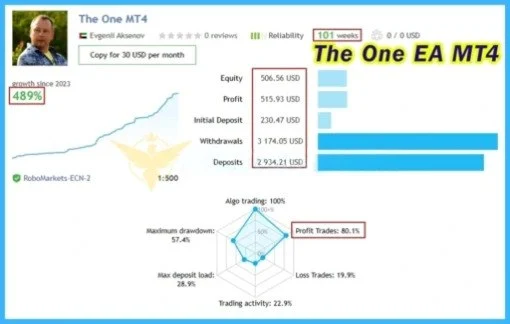
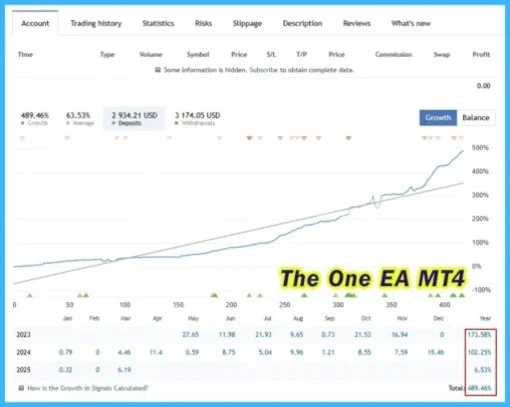
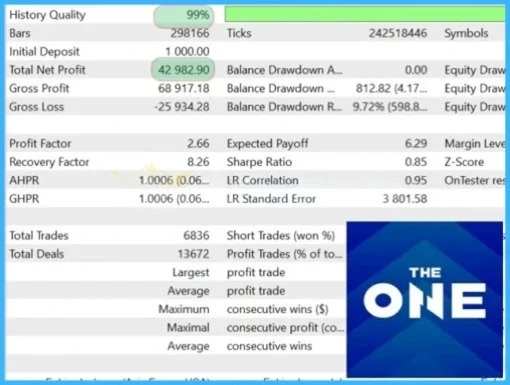
Final Verdict – Is The One EA MT5 Worth It?
Conclusion
What's Included
Login to add your review.
The installation was quick, and the default settings made it easy to get started. The EA runs smoothly on MT5 and has been simple to manage.
I wanted an automated trading solution that didn't require constant monitoring. The One EA has been easy to use, and I appreciate its structured approach to trade management.
As someone new to Forex trading, I found The One EA straightforward to install and configure. The setup guide was clear, and the automation helped me learn the platform
I've tested several MT5 Expert Advisors, and The One EA stands out for its clean setup and organized trading logic. Using it on a VPS has provided a stable trading experience
The EA has performed as expected based on its recommended settings. Using a low-spread broker and following the installation instructions made the experience smooth